Functional annotation
Time: 30 min
Objectives: Be able to collect functional information and attach it to a genome annotation.
Tools: interproscan, Eggnog, AGAT
Foreword
Answering “what does this gene do?” is challenging. One common strategy is to infer function by similarity: if a protein resembles one with a known role, we assume they share it. Yet this approach can be unreliable. Functional annotation therefore adds multiple layers of information—such as cellular location, pathway involvement, structural features as coiled-coil regions, signal peptides, conserved domains, protein families, etc. Together, these details provide a richer picture than a single function label and form the basis for interpreting new genomes and linking sequences to biological meaning.
Eggnog
Eggnog-mapper is a tool for fast functional annotation of novel sequences using precomputed orthologous groups and functional information from the EggNOG database. It provides annotations such as Gene Ontology (GO) terms, KEGG pathways, COG functional categories, and more.
Search for the
Eggnog Mapper functional sequence annotation by orthologytool in Galaxy
Select the
CDS/sORF amino acid sequencesfrom bakta.Run the tool
=> Look at the result by clicking on on the eggNOG Mapper line in your history on the right side.
the max_annot_lvl column represents the highest hierarchical taxonomic level.
This analyses catch a lot of different functional information type.
If we focus on KEGG related annotaiton inforamtion we have:
| Column | Meaning | What it tells you |
|---|---|---|
| KEGG_ko | KEGG orthology | Which function a protein is predicted to perform (A single KO may participate in several pathways) |
| KEGG_Pathway | KEGG pathway | Which broader biological network that function is associated with |
| KEGG_Module | KEGG functional module | Which defined set of functions a protein may contribute to |
| KEGG_Reaction | KEGG biochemical reaction | Which chemical reaction a protein may catalyse |
| KEGG_rclass | KEGG reaction class | Which type of chemical transformation occurs |
KEGG Pathways completeness
eggNOG-mapper assigns functional identifiers; KEGG provides the biological organisation of these functions; The KEGG Pathways completeness tool assesses which parts of the pathways or modules are covered by the annotations.
Data Preparation
Download the eggNOG Mapper annotations file from previous step. Extract the KEGG_ko column and transform it to get a proper list of KO value in that shape: K00873,K01951,K00942 (You have to remove - and ko: from the data) and save into a ko_list.csv file. An example is available at : https://github.com/jhayer/bioinfo_training_infectious_disease/blob/main/data/ko_list.csv.
Upload the created list
ko_list.csvwithin Galaxy using the upload interface .
.Search for the
Calculate KEGG Pathways completenesstool in GalaxyChoose
Text file containing a comma-separated list of KOsas the input type.Select the
ko_list.csvfile as input.Run the tool
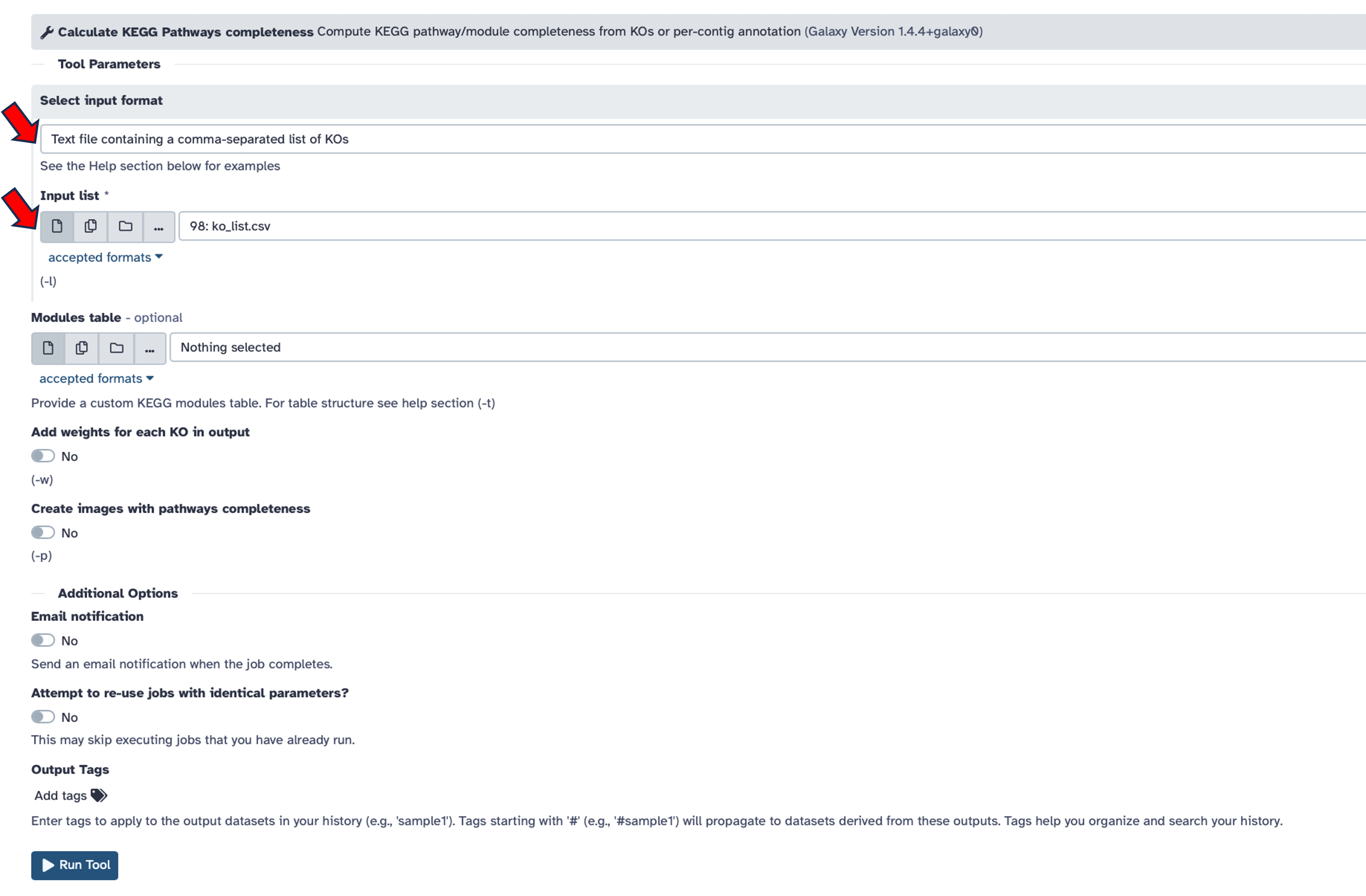
110 pathways
Take one pathway randomly from that output e.g. M00009 and go to the KEGG website to explore its details.
Interproscan
InterProScan enables the identification of pathways, protein families, domains, sites, structural domains, and other sequence features.
- Search for the
Interproscantool in Galaxy
- More inforamtion about available databases in interproscan can be found here.
--gotermsInterProScan maintains an internal database that links public database entries to established Gene Ontology (GO) terms. By including the –goterms option, you can add GO annotations to your dataset.--iprlookup: This option retrieves the corresponding InterPro identifiers for each motif. For example, the same motif may appear as PF01623 in Pfam and as IPR002568 in InterPro.-pa: This option provides mappings from matches to pathway information (MetaCyc and Reactome).
Runtime is approximately 2–3 seconds per protein, depending on the number of sequences submitted.
InterProScan produces three result files with the following extensions: .gff3, .tsv, and .xml.
Select the
CDS/sORF amino acid sequencesfrom bakta.Activate additional mappings (–iprlookup) (GO and pathway are activated by default)
Add
jsonandgff3as output formats.
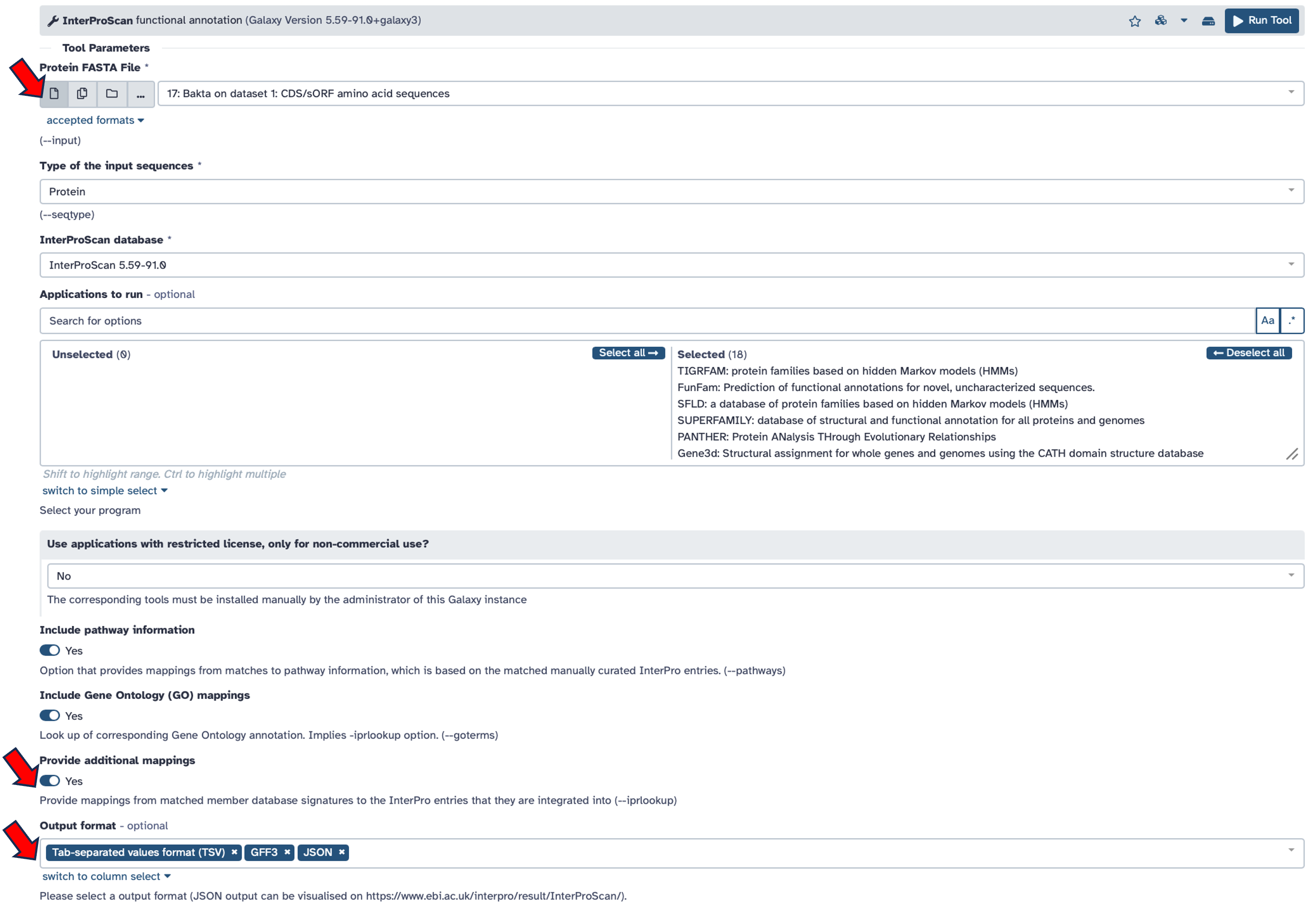
17 Databases
Download the
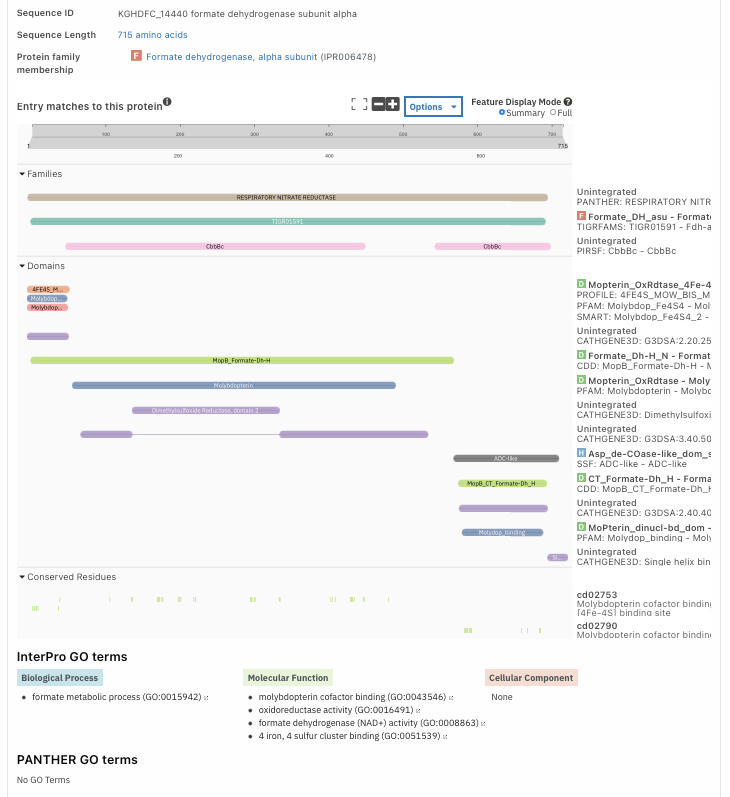
.jsonoutput file from InterProScan results. /! the file might be big…Go to InterProScan website: https://www.ebi.ac.uk/interpro/result/InterProScan/
Choose an entry (a protein), you will get all information about the functional annotation for that protein.
You can integrate Interproscan functional annotation into your structural GFF/GTF annotation using agat_sp_manage_functional_annotation.pl from AGAT from the Interproscan .tsvfile. This process adds the matches found within attributes called Dbxref and/or Ontology_term in the gene and transcript feature field (9th column).
Functional annotation can also serve as a quality check for your annotation. For example, if you are undecided between two versions of an annotation, prefer the one in which you recover a greater number of protein domains.