Prepare the metadata and the phyloseq object
phyloseq (McMurdie & Holmes 2013) is an R framework to store, analyse and plot microbiome data. A phyloseq object combines the ASV table, the taxonomy table and a metadata table describing the samples. We will use it for the diversity analysis.
Create the metadata table
Click Upload → Paste/Fetch data and paste the following table:
Sample  sample_name Metadata
SRR15702564 012618.SM92 UC
SRR15702563 012618.SM97 UC
SRR15702530 SM030818.140    Healthy
SRR15702529 SM030818.141    Healthy
In the upload settings, set the datatype to
tabularand check Convert spaces to tabs (in case the tabs were replaced by spaces when copying)Rename it
Metadata table
If you want to do any analysis with 42 samples, you can find here the 42 samples metadata:
Click Upload → Paste/Fetch data and paste the following link:
https://raw.githubusercontent.com/jhayer/bioinfo_training_infectious_disease/main/data/16s/metadata.txt
- Open Create phyloseq object from dada2 with:
- “Sequence table”: output of dada2: removeBimeraDenovo
- “Taxonomy table”: output of dada2: assignTaxonomy and addSpecies
- “Sample table”:
Metadata table
- Click Run Tool and rename the output
phyloseq object
The phyloseq object is the starting point of the diversity analysis.
Diversity analysis
In this part, we explore the ASVs obtained with DADA2 using phyloseq (McMurdie & Holmes 2013). We use Shiny-phyloseq (McMurdie & Holmes 2015), an interactive web interface to phyloseq that runs as a Galaxy interactive tool.
- Open Phyloseq (interactive tool) with:
- “Phyloseq R object”:
phyloseq object(output of Create phyloseq object from dada2)
- “Phyloseq R object”:
- Click Run Tool
- Open the interactive tool from User → Active Interactive Tools (or the link in the dataset) once it is running
A new page opens with Shiny-phyloseq, ready to explore the phyloseq object. The Data tab summarises the object: number of samples, ASVs, taxonomic ranks and metadata variables.
In the plots below, we color the samples by sequencing_run, the only grouping variable in our metadata table. Once the disease status of each sample is added to the metadata table, use it instead to compare UC cases and healthy controls, as the authors did.
Import the history
Alpha diversity
A diversity index is a quantitative measure of the variety of species in a community. The α diversity describes the diversity within a sample. It considers the number of different species (the richness) and how evenly the individuals are distributed among them (the evenness).
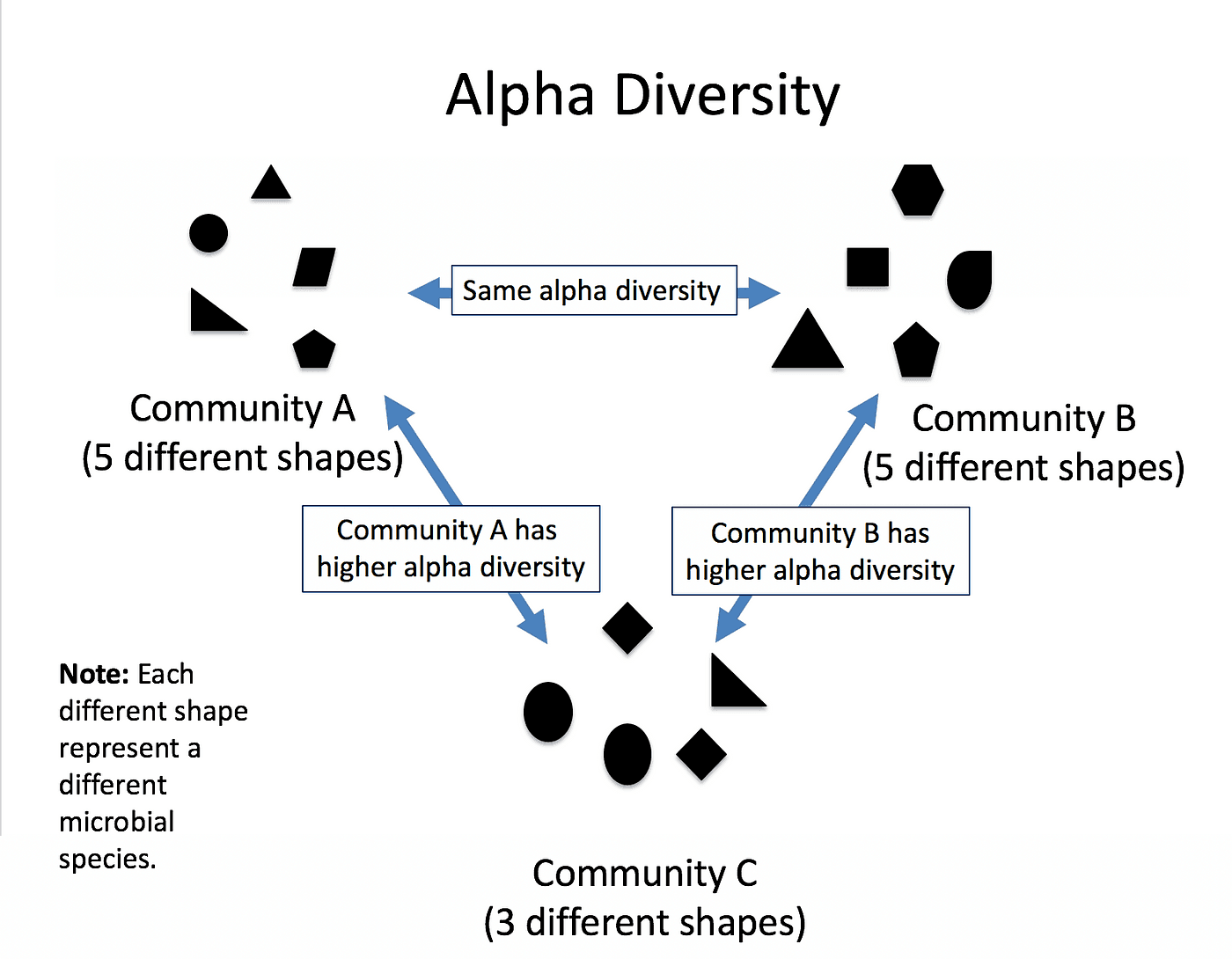
Here we plot the α diversity of each sample with 2 measures:
- The Shannon index, which calculates the uncertainty in predicting the species identity of an individual selected from a community. This is the index used by the authors.
- The Simpson index, which calculates the probability that two individuals selected from a community belong to different species.
- Click on the Alpha Diversity tab
- Select the following parameters:
- “X”:
sample_name - “Color”:
sequencing_run - “alpha Measures”:
Shannon,Simpson
- “X”:
The number of ASVs observed in a sample increases with the number of reads. Our samples have very different depths (from ~42,000 to ~195,000 read pairs before filtering), as in the original study. The authors checked that their alpha diversity results did not change after rarefying the samples (randomly subsampling them to the same number of reads). Richness estimates are the most sensitive to depth; the Shannon and Simpson indices are less affected.
- Which sample has the highest Shannon index?
- The authors found a lower Shannon index in UC cases than in healthy controls. Can we test this with our 4 samples?
- Read it from the plot.
- No. With 2 samples per group, a statistical test has almost no power, and here the groups would also be confounded with the sequencing run. The authors used 42 samples and a Wilcoxon rank-sum test.
Beta diversity
The β diversity measures how different the samples are from each other. A distance (or dissimilarity) is computed between each pair of samples, and the distance matrix is projected in 2 dimensions with an ordination method to visualise it. Samples close to each other in the plot have similar communities.
As the authors did, we use the Bray–Curtis dissimilarity, which takes the abundance of the ASVs into account, and a PCoA (Principal Coordinates Analysis), which projects the samples so that the distances in the plot are as close as possible to the Bray–Curtis distances.
Phyloseq offers several other ordination methods, for example NMDS (Non-metric Multidimensional Scaling), which keeps the rank order of the distances rather than their exact values, or constrained methods (CCA, RDA) that relate the community composition to measured variables.
- Click on the Ordination tab
- Select the following parameters:
- “Display”:
Samples - “Method”:
PCoA - “Distance”:
bray - “Transform”:
Prop(relative abundances, so that differences in sequencing depth do not drive the distances) - “Color”:
sequencing_run
- “Display”:
- What percentage of the variation is explained by the first axis?
- Are the samples from the two sequencing runs separated? Can you conclude that their gut microbiomes are different?
- Read it from the axis label.
- Even if they are separated, we cannot conclude: with 4 samples, the separation cannot be tested, and a difference between runs may be a technical batch effect rather than a biological one. The authors used a PERMANOVA test on 42 samples to show that UC cases and healthy controls are separated (R² = 0.098, p = 0.001 with the 16S data).
Taxonomic composition
Abundance barplots display the relative abundance of the taxa in each sample, to compare the composition of the communities.
- Click on the Bar tab
- Select the following parameters:
- “X-axis”:
sample_name - “Color”:
Family - “Facet Col”:
sequencing_run
- “X-axis”:
- Click on (Re)Build Graphic
The barplot is often hard to read: with many families, the color palette is too small to distinguish them. We filter the data to keep only the most abundant taxa.
- Click on the Filter tab
- Select the following parameters:
- “Taxa Min.”:
500
- “Taxa Min.”:
- Click on Execute Filter
- Go back to the Bar tab and click on (Re)Build Graphic
- Which families dominate the samples?
- Do you find the families highlighted by the authors (Lachnospiraceae, Oscillospiraceae, Akkermansiaceae, Enterobacteriaceae)?
- and 2. Look at the families with the largest bars.
Stacked barplots become hard to read with many taxa. The ampvis2 team suggests using heatmaps instead. You can plot one in the Heatmap tab of Shiny-phyloseq, or with the ampvis2 tools available in Galaxy.
Conclusion
We processed raw paired-end 16S amplicon reads with the DADA2 tools in Galaxy:
- Inspected the read quality and chose truncation lengths that keep enough overlap to merge the reads
- Filtered the reads, learned the error rates, inferred the sequence variants, merged the pairs and removed the chimeras to obtain an ASV table
- Assigned a taxonomy to the ASVs with the DADA2 naive Bayesian classifier and SILVA
- Explored the alpha diversity, beta diversity and taxonomic composition of the samples with phyloseq
- DADA2 models the sequencing errors to infer exact sequence variants (ASVs), which are more accurate and reproducible than OTUs.
- Truncation lengths are chosen from the quality profiles, while keeping enough overlap to merge the reads: with 2 × 150 bp reads on V4, the room for truncation is small.
- Tracking the reads through the pipeline shows whether a step (merging, chimera removal) lost too many reads.
- Species assignment from short 16S fragments is limited; genus or family levels are more reliable.
- Alpha diversity describes each sample, beta diversity compares samples. Group comparisons need enough samples, and groups should not be confounded with sequencing runs.