Read Quality Control and Trimming with fastp
Questions
- How can I describe the quality of my data?
- How can we get rid of sequence data that does not meet our quality standards?
Objectives
- Interpret a per-base quality plot summarizing quality across all reads.
- Assess and clean FASTQ reads in a single step using fastp.
- Compare the quality of the reads before and after filtering.
Why check and clean the reads?
During sequencing, errors are introduced, such as incorrect nucleotides being called. These are due to the technical limitations of each sequencing platform. Sequencing errors might bias the analysis and can lead to a misinterpretation of the data. Adapters may also be present if the reads are longer than the fragments sequenced, and trimming these may improve the number of reads mapped or assembled. Sequence quality control is therefore an essential first step in any analysis.
Before doing any assembly, the first questions we should ask about the input reads include:
- What is the coverage of my genome?
- How good are my reads?
- Do I need to ask/perform for a new sequencing run?
- Is it suitable for the analysis I need to do?
Paired-end sequencing generates 2 FASTQ files:
- One file with the sequences corresponding to forward orientation of all the fragments
- One file with the sequences corresponding to reverse orientation of all the fragments
Usually we recognize these two files which belong to one sample by the name which has the same identifier for the reads but a different extension, e.g. JC1A_R1.fastq for the forward reads and JC1A_R2.fastq for the reverse reads. It can also be _f or _1 for the forward reads and _r or _2 for the reverse reads.
Illumina sequencing data can contain:
| Problem | What it is | Why it’s bad |
|---|---|---|
| Adapters | Short artificial sequences added during library preparation | Can look like real DNA and confuse aligners or assemblers |
| Low-quality bases | The ends of reads often have unreliable base calls (low Phred scores) | Introduces errors |
| Very short reads | After trimming, some reads are too short to be useful | Adds noise |
fastp: quality control and trimming in one tool
To assess and clean our reads, we will use fastp (Chen et al. 2018). Think of it like a “car wash” for raw sequencing reads 🚿: it removes everything dirty or low-quality that could confuse later steps, before any downstream analysis (assembly, mapping, classification, etc.).
fastp checks the quality and cleans the reads in a single run:
- It computes quality statistics on the raw reads
- It trims and filters the reads
- It computes the same statistics on the cleaned reads
- It writes a report (HTML and JSON) showing the quality before and after filtering, side by side
fastp is also very fast, and automatically detects adapters in paired-end data.
The cleaning steps
We will follow a classic stepwise cleaning process:
- Remove adapters
- Remove bad-quality bases at the start of the reads
- Remove bad-quality sections at the end of the reads, with a sliding window
- Throw away reads that are now too short
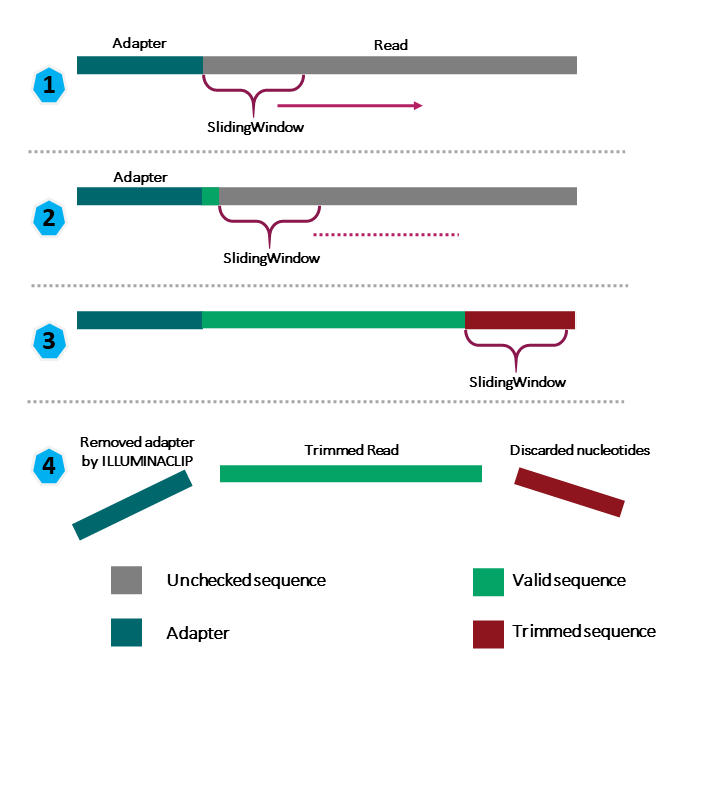
1. Remove adapters
For paired-end data, fastp detects adapters automatically by looking at the overlap between the forward and reverse reads: when a DNA fragment is shorter than the reads, both reads run into the adapter at the same position.
You can also give the adapter sequence explicitly. Choosing the correct adapter depends on how your Illumina library was prepared. In our case, the referenced paper does not specify the library preparation kit, so we will rely on the automatic detection.
2. Remove bad-quality bases at the start
fastp slides a window from the front (5’) of the read and removes the bases as long as the mean quality in the window is below a threshold. We will use a window of 4 bases and a mean quality of 20 (cut_front).
3. Remove bad-quality sections with a sliding window
fastp slides a window of 4 bases from the front to the right (5’ → 3’) of the read. As soon as the mean quality of the window drops below 20, it cuts the read from that position onward (cut_right), meaning it removes everything to the right, not just that small window.
Example: If the window at positions 32–36 drops below a quality of 20:
- fastp does not remove only those 4 bases.
- It removes everything from base 32 to the end of the read.
- The read becomes shorter — no blank space is left in the middle.
| fastp option | Value | Meaning |
|---|---|---|
| Adapter trimming | automatic detection (paired-end) | Remove adapters |
cut_front |
window 4, mean quality 20 | Cut low-quality bases at the start of the read |
cut_right |
window 4, mean quality 20 | Cut the read once the mean quality of the window drops below 20 |
length_required |
50 | Drop reads shorter than 50 bp |
4. Throw away reads that are now too short
Finally, we will drop the reads shorter than a certain length. We will use a minimum read length of 50 bp, considering that very short reads map ambiguously and add noise to the assembly.
In addition, by default fastp discards reads with too many low-quality bases (more than 40% of bases with a quality below 15) or with too many undetermined bases (N).
Running fastp on Galaxy
We are going to run fastp on our short reads, the collection Short Read (run ERR13363306).
We work in the history Quality Control and Trimming, created at the end of the Introduction to Galaxy. It should contain the 2 collections Short Read and Long Read. If not, copy them from the “Galaxy Tutorial” history with the History Multiview.
Type fastp in the tools panel search box, and click on fastp: fast all-in-one preprocessing for FASTQ files.
Input
- “Single-end or paired reads”:
Paired Collection - “Select paired collection(s)”:
Short Read
STEP 1: Adapters
In Adapter Trimming Options, keep adapter trimming enabled. fastp will detect the adapters automatically.
STEP 2: PolyG tail trimming
PolyG tail trimming is enabled for NextSeq/NovaSeq data by default. On Illumina two-color chemistry (NextSeq, NovaSeq, iSeq), “no signal” is read as G. When a fragment is shorter than the read length, the read ends in a run of artificial Gs with very high quality scores, so quality trimming does not remove them.
STEP 3: Quality cutting
In Read Modification Options → Per read cutting by quality options:
- “Cut by quality in front (5’)”:
Yes - “Cut by quality in tail (3’)”:
Yes - “Cutting window size”:
4 - “Cutting mean quality”:
20
STEP 4: Minimum length
In Filter Options → Length filtering options:
- “Length required”:
50. For 150 bp Illumina reads, a minimum length of 50 bp is a good choice (typical range 30 to 75). Very short reads map ambiguously and add noise to assembly, so the default of 15 is too permissive. Setting it too high (e.g., 100+) throws away reads that are still useful after adapter and tail trimming. Always check the fastp report to see if this threshold is relevant.
Keep the default values for the other filtering options (quality filtering: qualified quality 15, unqualified percent limit 40).
Reports
In Output Options, make sure the HTML report is produced, and tick JSON report: we will need it later to aggregate the reports with MultiQC (Ewels et al. 2016).
Run the tool
Once you have selected all the parameters, click on Run Tool. If you have any questions regarding what the tool is doing, you can also have a look at the help section.
Output
The tool takes a few minutes to run. It creates:
- fastp on collection X: Paired-end output: a paired collection with the cleaned forward and reverse reads. Rename it Trimmed short reads.
- fastp on collection X: HTML report: the quality report, before and after filtering. Rename it fastp HTML short reads.
- fastp on collection X: JSON report: needed to add the report in MultiQC. Rename it fastp JSON short reads.
fastp keeps the pairing of the reads: if one read of a pair is discarded (too short, too low quality), its mate is discarded too, so the forward and reverse files still correspond read by read. fastp can also save these orphan reads in separate unpaired outputs, but we will not need them.
Results
Click on the 👁️ (eye) icon of the HTML report to open it. 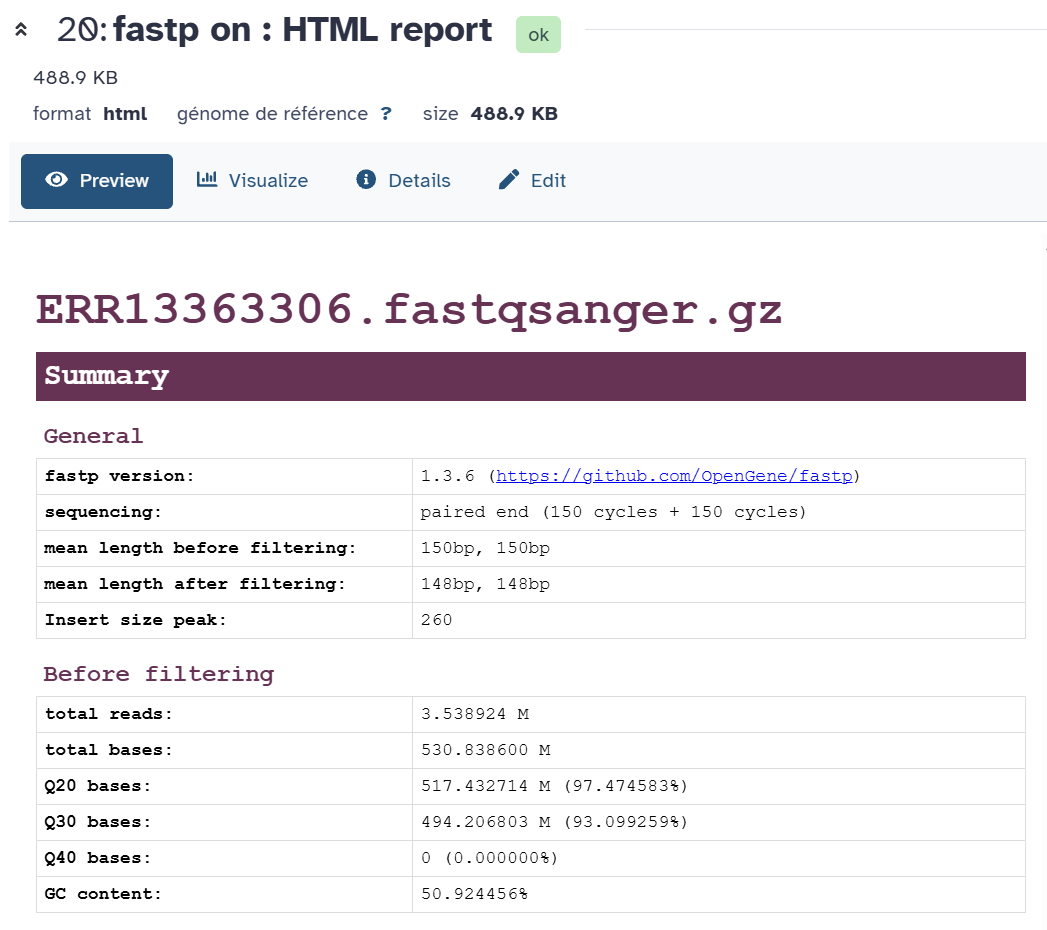
Summary
The Summary section gives general information (fastp version, sequencing type, read length, detected duplication rate, insert size) and the main statistics before filtering and after filtering: total reads, total bases, Q20 and Q30 rates (percentage of bases with a quality ≥ 20 or ≥ 30) and GC content.
Another important metric is the coverage: how many times, on average, each base of the genome is covered by reads. This helps you understand if you have enough data to assemble confidently.
- Using the Before filtering section, compute the coverage of the raw reads.
- Using the After filtering section, compute the coverage of the cleaned reads.
Discuss your results with a neighbor.
Coverage = total bases / genome size. The total bases given by fastp already include both the forward and reverse reads. Based on the paper and the genome deposited by the authors (GCA_964200035), the genome of strain 368 is made of a chromosome of ~4.89 Mb and 6 plasmids (~0.31 Mb in total), so approximately 5.2 Mb.
- Before filtering: 530.8 Mb / 5.2 Mb ≈ 102x.
- After filtering: 490.9 Mb / 5.2 Mb ≈ 94x.
The cleaning removed ~40 Mb (7.5% of the bases), but the coverage is still far above the ~30–40x that is enough for a bacterial genome assembly.
Filtering result
The Filtering result section shows how many reads passed the filters, and why the other ones were removed:
- reads passed filters
- reads with low quality: too many bases below the quality threshold
- reads with too many N
- reads too short: shorter than 50 bp after trimming
- reads with adapter dimer: reads made only of two adapters ligated together, with no DNA insert
- Should the output FASTQ files be smaller or bigger than the input files?
- What percentage of reads passed the filters?
- What is the main reason why reads were removed?
- How did the mean read length change?
- Were adapters found? Look at the Detected read1 adapter line of the Summary and at the Adapters section. What does it tell you about the library preparation?
- Smaller: we have trimmed bases and removed reads.
- 94.5% of the reads passed the filters (3.34 M out of 3.54 M).
- Reads that became too short after trimming: 192,872 reads (5.45%). Only 1,044 reads (0.03%) were removed for low quality, 2,252 (0.06%) were adapter dimers, and none had too many N.
- It went from 150 bp to 147 bp (read 1) and 146 bp (read 2): only a few bases were trimmed from most reads.
- Yes, but only a few: about 0.8% of the reads contain an adapter (fastp even suggests that the reads were probably trimmed before). The detected sequence
CTGTCTCTTATACACATCTis the Nextera transposase adapter. The paper does not name the library kit, but this tells us it was a Nextera-based kit (e.g. Nextera XT or Illumina DNA Prep), which uses a transposase (Tn5) to fragment the DNA and add the adapters at the same time.
Quality before and after filtering
The Before filtering and After filtering sections contain, for read 1 and read 2:
- quality: the mean quality at each position of the reads
- base contents: the proportion of A, T, C, G (and N) at each position. We expect the lines to be roughly flat; deviations at the beginning of the reads are common
- KMER counting and overrepresented sequences (if enabled): sequences that occur more often than expected, which may reveal adapters or contaminations
Look at the quality plots of read 1 and read 2, before and after filtering. 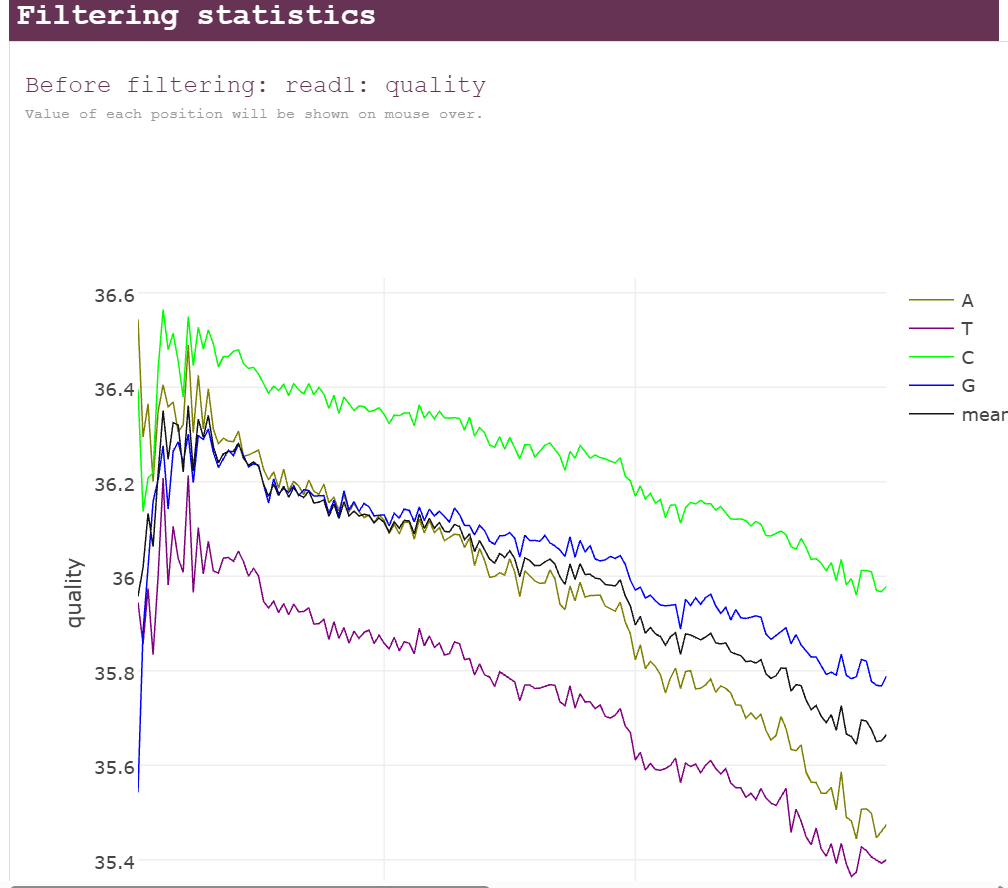 Discuss your results with a neighbor.
- What is a common trend among the 2 reads before filtering? Which read is of lower quality?
- How did the filtering change the quality profiles and the Q30 rate?
- Look at the base contents plots. The lines are flat along most of the read, except in the first ~15 bases. Why? Did fastp remove this pattern?
- Look at the quality score histogram. Why are there only 4 bars, and why is the Q40 rate 0%?
- The mean quality decreases slowly toward the end of the reads: from ~36 to ~35.7 for read 1, and from ~36 to ~35.0 for read 2. With Illumina data the quality gets worse as the read gets longer, because of signal decay and phasing during the sequencing run. As usual, the reverse reads (read 2) are of lower quality than the forward reads. Overall these reads are of very good quality: the mean quality stays above Q35 along the whole read.
- The worst bases have been removed, so the mean quality at the end of the reads is a bit higher (~36.2 for read 1, ~35.6 for read 2), and the reads now have different lengths. The Q30 rate went from 93.1% to 95.0%. The change is small because the raw reads were already good.
- This bias comes from the Nextera library preparation: the Tn5 transposase does not cut the DNA completely at random, but prefers some sequences. The first bases of each read therefore have a biased composition. These are real genomic bases, not sequencing errors, so fastp does not remove them (and we do not need to: this bias is harmless for an assembly).
- Recent Illumina sequencers (NovaSeq, NextSeq) bin the quality scores: instead of every value from 2 to 41, they only report a few values (here 2, 11, 25 and 37) to make the files smaller. The highest value is 37, so no base can reach Q40.
fastp automatically detects the quality encoding of the reads (phred33 for all recent Illumina data). If you work with very old data (phred64), you need to tell it explicitly.
We have just successfully assessed the quality of our reads and cleaned them with fastp, in a single step! From now on, we will only keep the cleaned paired collection fastp on collection X: Paired-end output. Rename it Trimmed Short Reads.
- It is important to know the quality of our data to make decisions in the subsequent steps.
- fastp checks the quality of the reads and removes adapters, low-quality bases and short reads in a single run.
- The fastp report shows the quality before and after filtering, which lets us check that the cleaning worked.
- The coverage (total bases / genome size) tells us if we have enough data for the assembly.
Read Quality and trimming of long reads
Now we are going to have a look at the long reads of the same sample: the collection Long Reads (run ERR13363634), downloaded in the Introduction to Galaxy and copied in this history. It contains a single dataset: Nanopore reads are not paired.
According to the ENA, ERR13363634 was sequenced on an Oxford Nanopore MinION and contains 133,532 reads for a total of 912.6 Mb, i.e. a mean read length of ~6.8 kb.
Why are long reads cleaned differently?
Nanopore reads are very different from Illumina reads:
| Illumina (ERR13363306) | Nanopore (ERR13363634) | |
|---|---|---|
| Read length | Fixed (150 bp) | Variable, from a few hundred bp to > 50 kb |
| Error rate | ~0.1% (Q30) | A few % (~Q10–Q20, depending on the chemistry and basecalling) |
| Main errors | Substitutions, at the end of the reads | Insertions and deletions, especially in homopolymers (e.g. AAAAAA) |
Because of this, the cleaning of long reads focuses on removing whole reads that are too short or of too low quality, rather than cutting the end of every read. For an assembly, what matters is to keep the long and accurate reads.
Common problems to check
The two technologies do not make the same kind of errors, so we do not look for the same problems in their QC reports.
Illumina (short reads): few errors, mostly substitutions (one base read as another), concentrated at the end of the reads.
| Problem | Why it happens | Where to see it | What to do |
|---|---|---|---|
| Quality drops at the end of the reads | The sequencing chemistry gets less accurate at each cycle | Quality curve along the read position | Trim the low-quality ends |
| Adapters in the reads | The DNA fragment is shorter than the read, so the sequencer reads into the adapter | Adapters section, insert size | Trim the adapters |
| Uneven base composition in the first ~10 bases | Bias of the library preparation (fragmentation, random primers) | Base content curve along the read position | Usually harmless; trim if it is strong |
| Poly-G tails | On 2-colour sequencers (NextSeq, NovaSeq), “no signal” is read as a G with a high quality | Base content curve: G increases at the end of the reads | Poly-G trimming (fastp does it automatically for these sequencers) |
| High duplication rate | Too many PCR cycles, or too little starting DNA | Duplication section | Interpret the coverage with caution |
Ambiguous bases (N) |
The sequencer could not call the base | N content curve | Filter reads with too many N |
Nanopore (long reads): many more errors, mostly insertions and deletions (indels), often in homopolymers (e.g. AAAAAAA, where the number of A is hard to count), spread along the whole read.
| Problem | Why it happens | Where to see it | What to do |
|---|---|---|---|
| Low-quality reads | Some reads are bad from start to end (pore problems, damaged DNA) | Read mean quality distribution | Filter on mean read quality (e.g. Q10) |
| Short reads | DNA fragmented during extraction or library preparation | Read length distribution, N50 | Filter on read length; improve the DNA extraction next time |
| Adapters and barcodes | Adapters are ligated to both ends of the DNA | Adapters section | Trim the adapters |
| Chimeric reads | Two DNA fragments ligated together and read as one | Adapters found in the middle of the reads | Split the reads at the internal adapters |
| Homopolymer errors | The signal does not change along a run of the same base | Not visible in the QC report | Polish the assembly (e.g. with medaka (Oxford Nanopore Technologies), or with Illumina reads) |
fastplong: fastp for long reads
fastplong (Chen 2023) is the long-read version of fastp, from the same developers. It works in the same way: in a single run, it computes quality statistics on the raw reads, cleans the reads, computes the same statistics on the cleaned reads, and writes an HTML and a JSON report before and after filtering.
What it can do on long reads:
- Remove adapters at the start and at the end of the reads, detected automatically
- Split chimeric reads: reads containing an adapter in their middle are made of two DNA fragments ligated together; fastplong splits them into separate reads
- Filter reads by quality: remove reads with a low mean quality
- Filter reads by length: remove reads that are too short
Which values should we use?
Several things must be taken into account:
- Coverage: our raw reads cover the genome (~5.2 Mb) about 175x. The assembler Flye (Kolmogorov et al. 2019) needs ~30–50x, so we can afford to lose some reads.
- Length: very short reads do not help the assembly, as they do not span repeats. But they must not be removed too aggressively: the genome of strain 368 contains small plasmids of 2.1, 3.6 and 7.9 kb. Their reads are short, as a read cannot be longer than the circular plasmid it comes from. A high minimum length would remove them, and the plasmids would be lost from the assembly. We will only remove reads shorter than 500 bp, well below the size of our smallest plasmid (2.1 kb).
- Quality: removing the worst reads improves the accuracy of the assembly. We will remove reads with a mean quality below Q10 (10% of errors): with a median quality around Q14, a higher threshold would remove too many reads.
| fastplong option | Value | Meaning |
|---|---|---|
| Adapter trimming | automatic detection (default) | Remove adapters at the start and end of the reads |
| Chimeric reads | split (default) | Split reads with an internal adapter into separate reads |
mean_qual |
10 | Drop reads with a mean quality below Q10 |
length_required |
500 | Drop reads shorter than 500 bp |
Running fastplong on Galaxy
Type fastplong in the tools panel search box, and click on the fastplong tool.
Input
- “Input Long Reads”: the Long Reads collection
STEP 1 and 2: Adapters and chimeric reads
In Adapter Trimming Options, keep adapter trimming enabled and the default “Chimeric read handling” (Split chimeric reads into segments). fastplong will detect the adapters automatically.
STEP 3: Quality filtering
In Filter Options → Quality filtering options:
- “Mean read quality”:
10
STEP 4: Minimum length
In Filter Options → Length filtering options:
- “Length required”:
500
Reports
In the output options, make sure the HTML report is produced, and tick JSON report: we will need it later to aggregate the reports with MultiQC.
Run the tool
Once you have selected all the parameters, click on Run Tool.
The tool creates:
- fastplong on data X: Reads: the cleaned long reads
- fastplong on data X: HTML report: the quality report, before and after filtering
- fastplong on data X: JSON report: needed to add the report in MultiQC
Rename the cleaned reads Trimmed Long Reads.
Results
Click on the 👁️ (eye) icon of the HTML report to open it. Its structure is the same as the fastp report.
- In the Summary section, what are the mean read length and the mean quality before filtering?
- In the Filtering result section, what percentage of reads passed the filters? What is the main reason why reads were removed?
- How did the mean read length and the mean quality change after filtering?
- What is the coverage of the trimmed long reads?
- Which graphs are present in fastplong, that are not present in fastp ?
The mean read length is … and the mean quality is …. The mean quality is much lower than for the Illumina reads, which is normal for Nanopore data.
…% of the reads passed the filters. The main reason why reads were removed is ….
The mean read length went from … to …, and the mean quality from … to …: the short and low-quality reads were removed.
Coverage = total bases / genome size = … Mb / 5.2 Mb ≈ …x.
fastplong has graphs that describe each read as a whole, which fastp does not have:
- Read length distribution: the percentage of reads and of bases for each read length
- Cumulative yield by minimum read length: how many reads and bases you keep if you only keep reads longer than a given length
- Read mean quality distribution and Read median quality distribution: one quality value per read, instead of one per position
- Density plot of read median quality and read length: are the long reads also good reads?
- Read GC content distribution: the GC content of each read
Why are they important for long reads, and not for short reads?
- Read length varies a lot. Illumina reads all have the same length (e.g. 150 bp), so a length graph would be a single bar. Nanopore reads range from a few hundred bases to tens of kilobases, and the length of the reads is what makes them useful: long reads span repeats and connect the contigs of the assembly. The length distribution, the N50 and the cumulative yield tell you how much useful long-read data you have, and help you choose the minimum length filter (here 500 bp) without losing too many bases.
- Quality is a property of each read, not of each position. With Illumina, quality decreases along the read (the per-position graph shows it), so we trim the ends. With Nanopore, errors are spread along the read, and some reads are bad from start to end. That is why we filter whole reads on their mean quality (here Q10), and the per-read quality graphs show what this filter removes.
- Long and good reads are not always the same reads. The density plot shows if the longest reads are also of good quality, to choose the length and quality filters together.
- Read GC content helps to spot reads from a contaminant with a different GC content, which appear as a second peak.
On the other hand, fastp has graphs that make sense only for short reads: duplication rate and insert size (estimated from the overlap of the two reads of a pair).
Quality Control Comparison
Open the HTML report from fastp (short reads), and the HTML report from fastplong (long reads). Look at the average size. Look at the average quality. Discuss the pros and cons of each HTS technology.
For both technologies, also check for contamination (reads from another organism): a second peak in the GC content distribution is a hint, and the contamination check confirms it.
(Optional), Use another tool: FastQC
FastQC (Andrews 2010) is another widely used quality control tool for sequencing reads. The most important plot of the FastQC quality report shows the quality score at each position of the reads. The image below shows a very high-quality sample:
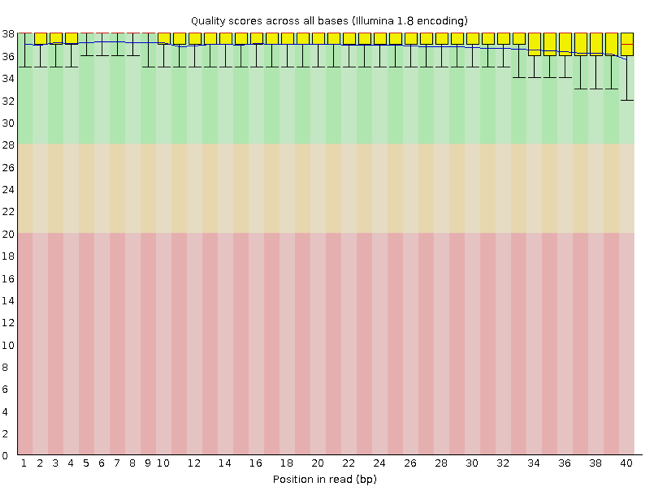
The x-axis displays the base position in the read, and the y-axis shows quality scores. In this example, the sample contains reads that are 40 bp long. This length is much shorter than the reads we are working on within our workflow. For each position, there is a box-and-whisker plot showing the distribution of quality scores for all reads at that position. The horizontal red line indicates the median quality score, and the yellow box shows the 1st to 3rd quartile range. This range means that 50% of reads have a quality score that falls within the range of the yellow box at that position. The whiskers show the whole range covering the lowest (0th quartile) to highest (4th quartile) values.
The quality values for each position in this sample do not drop much lower than 32, which is a high-quality score. The plot background is also color-coded to identify good (green), acceptable (yellow) and bad (red) quality scores.
Now let’s look at a quality plot on the other end of the spectrum.
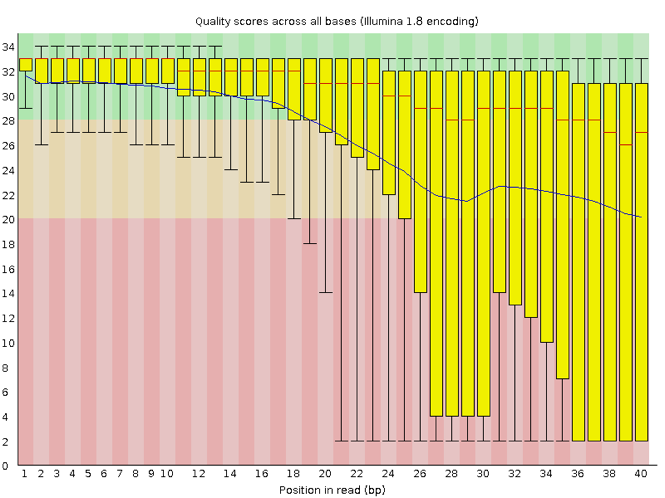
Here, we see positions within the read in which the boxes span a much more comprehensive range. Also, quality scores drop pretty low into the “bad” range, particularly on the tail end of the reads.
fastp shows the same information in a simpler way: one line per nucleotide (A, T, C, G) and one for the mean quality, at each position of the read.