Contamination or host screen
In this tutorial, we check that our reads come from E. coli only. We work in the history Quality Control and Trimming, which contains the trimmed reads Trimmed Short Reads and Trimmed Long Reads.
SRA Taxonomy Analysis
ON the SRA sample webpage, the taxonomy analysis is automatically computed for every sample.
The taxonomy analysis is automatically computed for every sample submitted to the Sequence Read Archive. ON the SRA webpage from our sample, look at the taxonomy analysis. Discuss with your neighbour about the composition.
Most reads should be assigned to Escherichia coli. A part of the reads is usually classified only to genus level (Escherichia), or to closely related genera such as Shigella, which is normal and likely reflects:
- Conserved genomic regions shared between Escherichia species and Shigella (genetically, Shigella are E. coli)
- Strain-specific sequences (e.g. plasmids, mobile elements) not well-represented in the reference database used for taxonomic classification
- Database limitations rather than actual contamination
Minor contaminants are acceptable: trace amounts of other bacteria are likely:
- Environmental flora from sample collection
- Cross-contamination during culture/handling (inevitable at trace levels)
- These tiny amounts won’t affect genome assembly quality
You should if filter if Contamination is >5-10% of total reads.
How does it work ?
To find out which microorganisms are present, we will compare the reads of the sample to a reference database, i.e. sequences of known microorganisms stored in a database, using Kraken2.
What do you think is harder to assign, a species (like E. coli) or a phylum (like Proteobacteria)?
Assigning a species is generally much harder than assigning a phylum. Here’s why:
Sequence similarity
At the phylum level, organisms are very different from each other. Even short reads often contain enough signal to confidently place them in a broad category like Proteobacteria.
At the species level, differences can be very small. For example, E. coli shares a huge portion of its genome with Shigella or other Escherichia species. Short reads might not capture unique sequences, making it difficult to distinguish between closely related species.
Database coverage
All taxonomic mapping tools rely on reference databases. Some species are underrepresented or missing, while higher-level taxa are well-covered. This makes phylum assignments more robust.
Genomic variability
Within a species, there can be large genomic diversity (e.g., different E. coli strains). This intra-species variation can confuse classifiers and lead to ambiguous assignments.
Conclusion
Phyla are defined by broader evolutionary signals, so natural variability within them doesn’t affect classification as much. In short: Assigning E. coli (species) is harder than assigning Proteobacteria (phylum) because species-level differences are subtler, databases may be incomplete, and intra-species variability can obscure signals.
How does Kraken work:
In the k-mer approach for taxonomy classification, we use a database containing DNA sequences of genomes whose taxonomy we already know. On a computer, the genome sequences are broken into short pieces of length k (called k-mers), usually 30bp.
Kraken examines the k-mers within the query sequence, searches for them in the database, looks for where these are placed within the taxonomy tree inside the database, makes the classification with the most probable position, then maps k-mers to the lowest common ancestor (LCA) of all genomes known to contain the given k-mer.
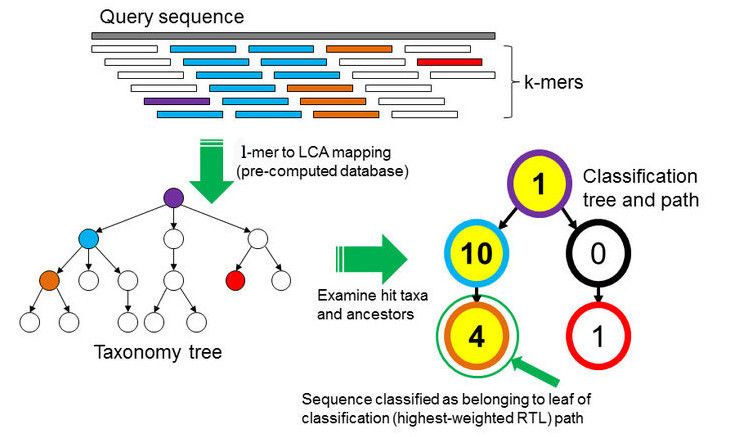
Kraken2 uses a compact hash table, a probabilistic data structure that allows for faster queries and lower memory requirements. It applies a spaced seed mask of s spaces to the minimizer and calculates a compact hash code, which is then used as a search query in its compact hash table; the lowest common ancestor (LCA) taxon associated with the compact hash code is then assigned to the k-mer.
You can find more information about the Kraken2 algorithm in the paper Improved metagenomic analysis with Kraken 2.
Kraken reference database: Standard and MiniKraken2
A Kraken dataset is essentially a collection of reference sequences (genomes or proteins) that the software uses to classify sequencing reads. The process to build it involves:
Collecting reference sequences – For example, complete bacterial, viral, or human genomes from RefSeq. Optionally, plasmids, fungi, plants, and vector sequences can be included.
Breaking sequences into k-mers – Each reference sequence is split into short, fixed-length DNA fragments called k-mers (commonly 35 bp).
The Standard database contains archaea, bacteria, viral, plasmid, human and UniVec_Core sequences, with a k-mer size of 35. It is large (more than 50 GB), so it needs a lot of memory and time to run.
For this tutorial, we will use MiniKraken2, a reduced version built from the RefSeq bacteria, archaea and viral genomes and the human genome. It is capped at 8 GB: only a subset of the k-mers of each genome is kept. It runs much faster, but it is less sensitive: some reads that would be classified with the Standard database stay unclassified.
The table below lists the reference libraries that can be included in a Kraken2 database, and which ones are in each database.
| Library | Origin | Standard | MiniKraken2 |
|---|---|---|---|
| Archaea | RefSeq complete archaeal genomes/proteins | ✅ | ✅ |
| Bacteria | RefSeq complete bacterial genomes/proteins | ✅ | ✅ |
| Plasmid | RefSeq plasmid nucleotide/protein sequences | ✅ | ❌ |
| Viral | RefSeq complete viral genomes/proteins | ✅ | ✅ |
| Human | GRCh38 human genome/proteins | ✅ | ✅ |
| UniVec_Core | A subset of UniVec, NCBI-supplied database of vector, adapter, linker, and primer sequences that may be contaminating sequencing projects and/or assemblies, chosen to minimize false positive hits to the vector database | ✅ | ❌ |
| Fungi | RefSeq complete fungal genomes/proteins | ❌ | ❌ |
| Plant | RefSeq complete plant genomes/proteins | ❌ | ❌ |
| Protozoa | RefSeq complete protozoan genomes/proteins | ❌ | ❌ |
A contamination by a fungus, a plant or a protozoan will not be identified with these databases: most of its reads will appear as unclassified. A large fraction of unclassified reads can therefore also be a hint of contamination.
Run Kraken2 in Galaxy
We run Kraken2 (Wood et al. 2019) on the trimmed short reads, with the following parameters:
| Parameter | Value | Meaning |
|---|---|---|
| Confidence | 0.0 (default) | Minimum fraction of the k-mers of a read that must support its classification. 0.0 gives the most sensitive classification: we want to detect any contamination, even at a low level. Higher values increase the precision at the cost of sensitivity. |
| Minimum Base Quality | 10 (default: 0) | Bases with a quality below 10 (more than 10% chance of error) are masked and ignored: a k-mer containing a wrong base can match the wrong taxon. Our reads are already trimmed, so very few bases are masked. |
| Create Report | Yes | The report summarises how many reads are assigned to each taxon. We need it for the visualisation with Krona. |
- Search the tool Kraken2.
- In Single or paired reads, select Paired Collection, and the collection Trimmed Short Reads.
- In Select a Kraken2 Database, select MiniKraken2.
- In Minimum Base Quality, enter 10.
- In Create Report, click Yes for Print a report with aggregrate counts/clade to file.
- Keep the default values for the other parameters, and click Run Tool.
Bracken (Lu et al. 2017) re-estimates the abundance of each species: Kraken2 assigns many reads only to the genus or family level (their k-mers are shared between several species), and Bracken redistributes them to the species level.
This is useful in metagenomics, to compare the abundance of species in a community. For a contamination check of a pure culture, we do not need it: we only want to know whether reads come from another organism, and in which proportion. The Kraken2 report already answers this question.
Kraken2 Output Overview
Kraken2 generates two output files per dataset (e.g., one per sample):
- Kraken2 on collection X: Classification: the classification of each read. Rename it Kraken2 classification short reads.
- Kraken2 on collection X: Report: the number of reads assigned to each taxon. Rename it Kraken2 report Short Reads.
Classification
Each line corresponds to one sequence and has 5 columns:
| Column | Meaning |
|---|---|
| C/U | C = classified, U = unclassified |
| Sequence ID | Identifier from the input file |
| Taxonomy ID | NCBI taxonomy ID assigned to the sequence (0 if unclassified) |
| Length | Length of the sequence in bp (read1|read2 for paired reads) |
| LCA Mapping | A space-delimited list indicating the lowest common ancestor (LCA) mapping of each k-mer in the sequence |
For example for the LCA Mapping, the result 562:13 561:4 A:31 0:1 562:3 would indicate that:
- The first 13 k-mers mapped to taxonomy ID 562
- The next 4 k-mers mapped to taxonomy ID 561
- The next 31 k-mers contained ambiguous nucleotides (
A)
- The next k-mer was not found in the database (
0)
- The last 3 k-mers mapped to taxonomy ID 562
Visualization of taxonomic assignment
Once we have assigned the corresponding taxa to each sequence, the next step is to properly visualize the data. There are several tools for that. In our case, we will use Krona.
Krakentools (Lu et al. 2017) is a suite of tools to work on Kraken outputs. It include a tool designed to translate results of the Kraken metagenomic classifier to the full representation of NCBI taxonomy. The output of this tool can be directly visualized by the Krona tool
- In the Tool, type : Krakentools: Convert kraken report file to krona text file
- Kraken report file, select Kraken2 report Short Reads
- Click, Run tools
Let’s now run Krona !
- In the Tool, type Krona pie chart from taxonomic profile
- Input file: output of Krakentools
- Click Run Tool
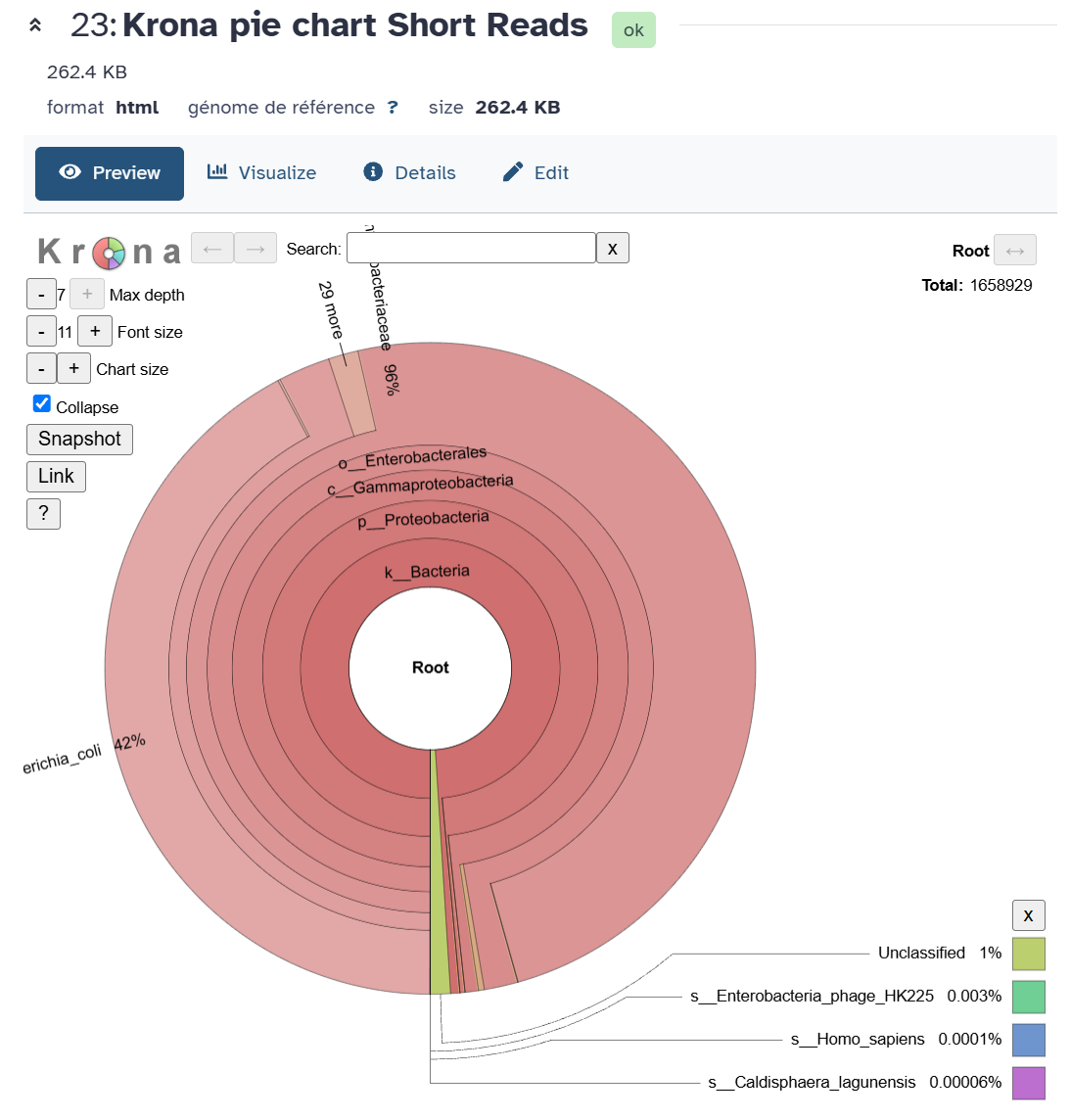
Does it look like there is contamination ? No, it does not !
Contamination screen of the long reads
The long reads come from the same DNA extraction of the same sample, but it is still worth checking them: a contamination can also be introduced during the Nanopore library preparation, or come from another sample sequenced on the same flow cell (barcode cross-talk).
Kraken2 works on reads of any length, as it only looks at the k-mers of each read. We can therefore use the same tool and the same database on the long reads Trimmed Long Reads.
What changes for long reads?
- Single-end reads: Nanopore reads are not paired.
- Base quality: for the short reads, we masked the bases with a quality below 10. Our Nanopore reads have a median quality around Q14: with the same threshold, a large part of their bases would be masked, and many k-mers would be lost. We keep the default value (
0). - Sequencing errors: with ~4% of errors, many 35-mers of a long read contain an error and are not found in the database. But a read of several kb contains thousands of k-mers: enough of them are correct to classify the read.
- Search the tool Kraken2.
- Select single-end reads, and the collection Trimmed Long Reads.
- Keep the default Minimum Base Quality (0).
- In Select a Kraken2 Database, select the same database as for the short reads: MiniKraken2.
- In Create Report, click Yes for Print a report with aggregrate counts/clade to file.
- Click Run Tool
- Rename the outputs:
- Kraken2 on collection X: Classification → Kraken2 classification long reads
- Kraken2 on collection X: Report → Kraken2 report Long Reads
- Run Krakentools: Convert kraken report file to krona text file on Kraken2 report Long Reads.
- Run Krona pie chart from taxonomic profile on its output.
Open the 2 Krona charts (short reads and long reads) side by side.
- Which species is the most abundant in each dataset? What percentage of the reads is assigned to it?
- Is the proportion of unclassified reads the same in both datasets? Why?
- Do you see the same minor organisms in both datasets? Is there evidence of contamination?
- Escherichia coli should be the most abundant species in both datasets, as expected for a pure culture of strain 368.
- The proportions differ. The Nanopore reads contain more sequencing errors, so fewer of their k-mers match the database exactly, and some reads are classified at a higher level (e.g. genus Escherichia) or not at all. On the other hand, each long read contains many more k-mers than a short read, which gives more evidence for its classification.
- Organisms found in both datasets at more than a few percent would point to a contamination of the sample itself. Organisms found only in one dataset at low levels are more likely due to the library preparation, to the sequencing run (e.g. barcode cross-talk with other samples), or to classification errors. As for the short reads, filtering is only needed if the contamination is above ~5–10% of the reads.