Building an ASV table from 16S data using DADA2 in Galaxy
Questions
- What are the primary steps involved in generating an ASV table from 16S rRNA gene sequencing data?
- How does denoising (DADA2) improve the accuracy of microbial community analysis compared to traditional OTU-based methods?
- Why are quality inspection and read truncation important, and how do they impact downstream analyses?
- How can we assign taxonomy to ASVs and prepare them for diversity analysis?
Objectives
- Inspect the quality of paired-end 16S reads and choose truncation parameters
- Run the DADA2 pipeline step by step in Galaxy: filter and trim, learn error rates, denoise, merge pairs, remove chimeras
- Track the number of reads kept at each step
- Assign taxonomy with the DADA2 naive Bayesian classifier and the SILVA database
- Build a phyloseq object for the diversity analysis
This tutorial is adapted from the Galaxy Training Network tutorial Building an amplicon sequence variant (ASV) table from 16S data using DADA2 (Bérénice Batut et al.), applied to a human gut dataset and run on Galaxy Australia. Some graphics come from a note in microbenotes.
Introduction
The investigation of environmental microbial communities and microbiomes has been revolutionized by the development of high-throughput amplicon sequencing. In amplicon sequencing a particular genetic locus, for example the 16S rRNA gene (or a part of it) in bacteria, is amplified from DNA extracted from the community of interest, and then sequenced on a next-generation sequencing platform. This technique removes the need to culture microbes in order to detect their presence, and cost-effectively provides a deep census of a microbial community.
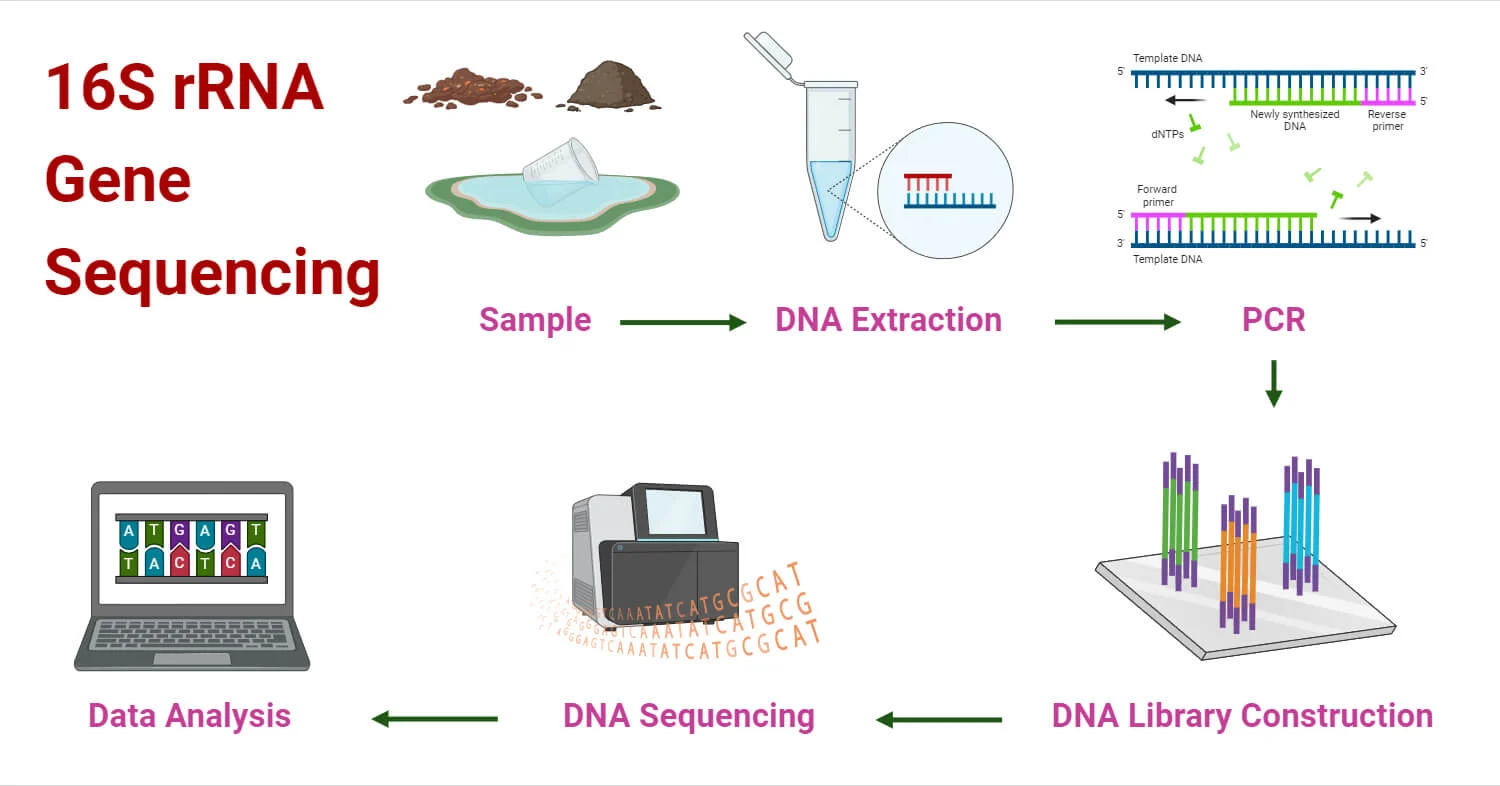
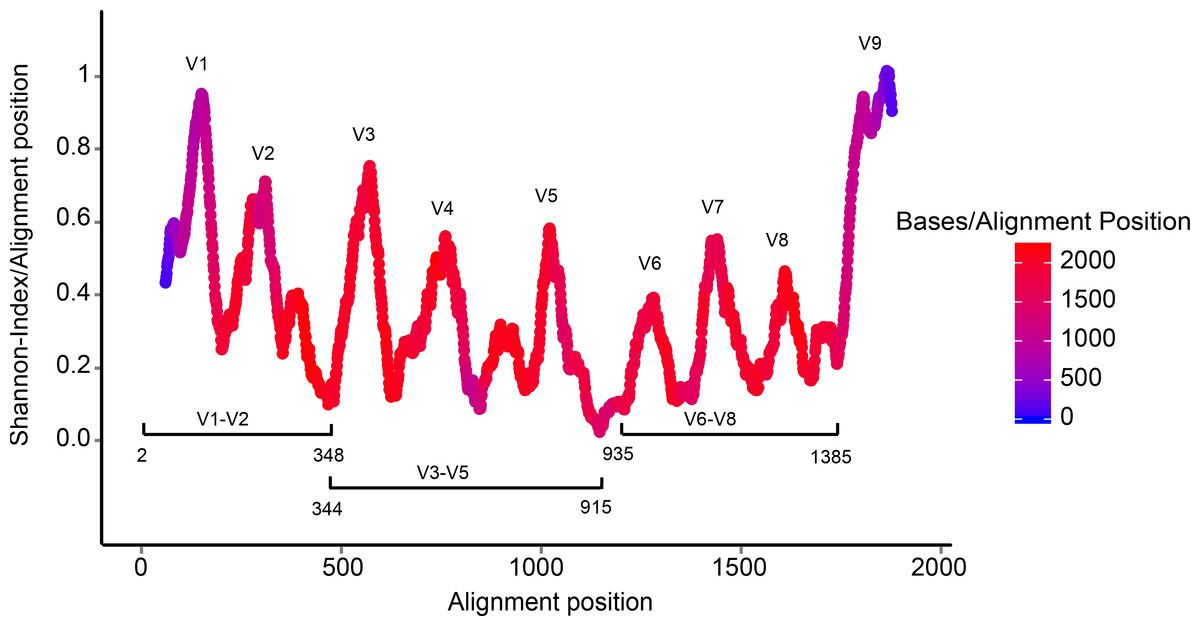
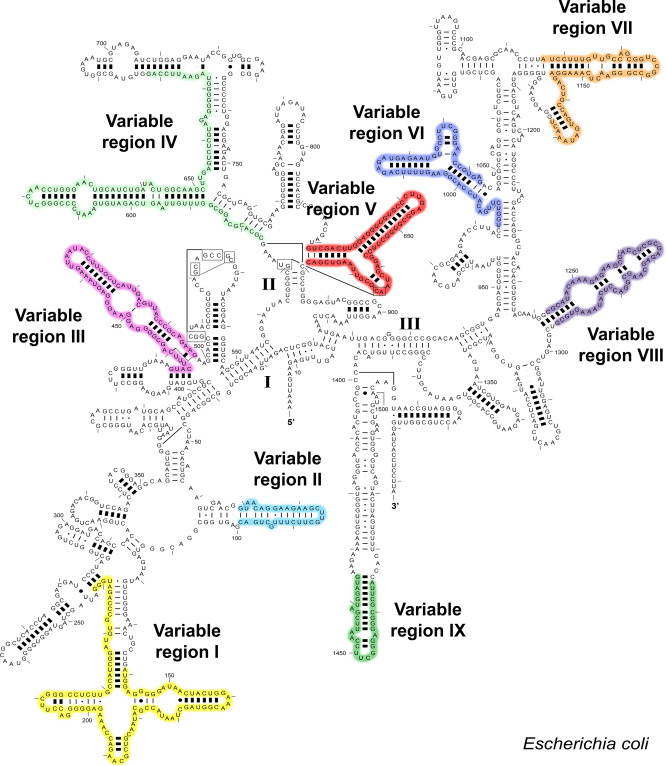
What is the 16S ribosomal RNA gene ?
How to process 16S amplicon sequencing data ?
To process 16S amplicon sequencing data, several tools exist: QIIME 2 (Bolyen et al. 2019), Mothur, Lotus2 and DADA2 (Callahan et al. 2016). All these tools can be used in Galaxy. In this tutorial we will use DADA2.
In Galaxy, each function of the DADA2 R package is available as a separate tool (dada2: filterAndTrim, dada2: learnErrors, dada2: dada…). Running them one by one lets us look at the result of every step of the pipeline.
ASVs instead of OTUs
The output of the DADA2 pipeline is a feature table of amplicon sequence variants (an ASV table): a matrix with rows corresponding to samples and columns to ASVs, in which the value of each entry is the number of times that ASV was observed in that sample. This table is analogous to the traditional OTU table, except that one gets the actual sequences of the “true” sequence variants instead of rather anonymous and abstract entities called OTU1, OTU2, etc.
The process of amplicon sequencing introduces errors into the sequencing data, and these errors severely complicate the interpretation of the results. DADA2 implements an algorithm that models the errors introduced during amplicon sequencing, and uses that error model to infer the true sample composition. As shown in the DADA2 paper and in further benchmarking, this method is more sensitive and specific than traditional OTU methods: it detects real biological variation missed by OTU methods while outputting fewer spurious sequences.
The dataset
The data come from a gut microbiome study of pediatric ulcerative colitis (UC), a chronic inflammatory bowel disease:
Zuo W, Wang B, Bai X, Luan Y, Fan Y, Michail S, Sun F. 16S rRNA and metagenomic shotgun sequencing data revealed consistent patterns of gut microbiome signature in pediatric ulcerative colitis. Scientific Reports (2022). doi:10.1038/s41598-022-07995-7
The authors collected stool samples from 19 children and young adults with UC and 23 healthy controls (7–21 years old) at the Children’s Hospital of Los Angeles. Each sample was sequenced in two ways: 16S rRNA amplicon sequencing and shotgun metagenomic sequencing, to check whether both approaches give the same picture of the gut microbiome.
| 16S data used in this tutorial | |
|---|---|
| Sample | Human stool (fecal DNA extracted with the QIAamp PowerFecal kit) |
| Target | V4 region of the 16S rRNA gene |
| Primers | 515FB GTGYCAGCMGCCGCGGTAA / 806RB GGACTACNVGGGTWTCTAAT |
| Sequencing | Illumina MiSeq, 2 × 150 bp paired-end |
| Data | NCBI BioProject PRJNA759642 |
Our subset
To keep the analysis short, we will use 4 samples out of the 42:
| SRA run | Sample name | Metadata |
|---|---|---|
| SRR15702564 | 012618.SM92 | UC |
| SRR15702563 | 012618.SM97 | UC |
| SRR15702530 | SM030818.140 | Healthy |
| SRR15702529 | SM030818.141 | Healthy |
With only 4 samples, we can learn every step of the workflow, but statistical tests (e.g. comparing groups) will have very little power. The results will not necessarily reproduce the conclusions of the paper, which were obtained on 42 samples.
Prepare Galaxy and data
Import the workflow
You can either follow the tutorial below, or import the dada2 workflow.
Create a history
- Create a new history for this analysis
- Rename it, e.g.
16S Gut Microbiome
Import the reads from SRA
DADA2 expects a set of demultiplexed FASTQ files: one forward and one reverse file per sample. It also expects that there are no non-biological bases (primers, adapters) in the reads: in this dataset, the primers are not present in the reads.
As in the Galaxy introduction, we download the reads directly from the SRA with their accession numbers.
Create a new file with Upload → Paste/Fetch data, containing the 4 accessions, one per line:
SRR15702564
SRR15702563
SRR15702530
SRR15702529
Set the datatype to
txtand name itSRA accessions.Open Faster Download and Extract Reads in FASTQ format from NCBI SRA with:
- “select input type”:
List of SRA accession, one per line - “sra accession list”:
SRA accessions
- “select input type”:
Click Run Tool
Rename the
Pair-end data (fasterq-dump)collection to16S Raw Reads
The tool creates a list of dataset pairs: one element per sample, named with its SRA accession (e.g. SRR15702564), containing a forward and a reverse file.
The DADA2 tools name the samples after the element identifiers of the collection, here the SRA accessions. We will use exactly the same names in the metadata table later.
Click on the collection and look at the reads of a sample of each batch (SRR15702564 and SRR15702530). Are all reads 150 bp long?
No. The two pairs of samples were not sequenced in the same run: the forward reads are 150 bp for all samples, but the reverse reads of SRR15702564 and SRR15702563 are shorter (140 bp) than those of SRR15702530 and SRR15702529 (~151 bp). We need to keep this in mind when choosing the truncation lengths: with DADA2, reads shorter than the truncation length are discarded.
Sort the collection
Some DADA2 tools process the samples one after the other in a single job and expect the collection to be sorted.
- Open Sort collection with:
- “Input Collection”:
16S Raw Reads - “Sort type”:
alphabetical
- “Input Collection”:
- Rename the output
Sorted Raw Reads
Processing data using DADA2
Once demultiplexed FASTQ files without non-biological nucleotides are in hand, the DADA2 pipeline proceeds as follows:
- Prepare reads
- Inspect read quality profiles
- Filter and trim
- Learn the error rates
- Infer sample composition
- Merge forward/reverse reads
- Construct sequence table
- Make sequence table
- Remove chimeras
- Assign taxonomy
Prepare reads
Inspect read quality profiles
Before filtering, we look at the quality of the reads to decide where to truncate them.
- Open dada2: plotQualityProfile with:
- “Processing mode”:
Joint- “Paired reads”:
paired - in a data set pair- “Paired short read data”:
Sorted Raw Reads
- “Paired short read data”:
- “Aggregate data”:
No
- “Paired reads”:
- “sample number”:
10000000
- “Processing mode”:
- Click Run Tool
dada2: plotQualityProfile generates 2 PDF files with the quality profiles of each sample: one for the forward reads and one for the reverse reads.
In gray-scale is a heatmap of the frequency of each quality score at each base position. The mean quality score at each position is shown by the green line, and the quartiles of the quality score distribution by the orange lines. The red line shows the scaled proportion of reads that extend to at least that position.
Inspect the forward and reverse outputs of plotQualityProfile:
- Are the forward reads good quality?
- We generally advise trimming the last few nucleotides to avoid less well-controlled errors that can arise there. What would you recommend as truncation position for the forward reads?
- Are the reverse reads good quality?
- What would you recommend as truncation position for the reverse reads?
- Look at the red line of the reverse reads of
SRR15702564. What does it show?
- The forward reads are good quality over most of their length.
- We will truncate the forward reads at position 145, trimming the last few nucleotides.
- The reverse reads are of worse quality, especially at the end, which is common in Illumina sequencing. DADA2 incorporates quality information into its error model, but trimming the low-quality end improves its sensitivity to rare sequence variants.
- We will truncate the reverse reads at position 135. This is also below the length of the shortest reverse reads (140 bp), so no sample loses all its reads.
- The red line drops at position 140: no read of this sample is longer than 140 bp.
We cannot truncate much more than this: the reads must still overlap to be merged (see below).
Your reads must still overlap after truncation in order to be merged! DADA2 requires at least 12 nucleotides of overlap by default, plus some margin for the natural length variation of the amplicon. The longer the overlap, the more robust the merging.
In this dataset, the primers are not in the reads, so the reads cover the region between the primers: about 253 bp for V4. With 2 × 150 bp reads, the room for truncation is small:
| Truncation (forward + reverse) | Overlap on a 253 bp region | |
|---|---|---|
| 150 + 140 = 290 | ~37 bp | OK |
| 145 + 135 = 280 | ~27 bp | Used here |
| 140 + 130 = 270 | ~17 bp | Risky |
| < 265 | < 12 bp | Merging fails |
So with short reads, the truncation is guided by the overlap as much as by the quality scores. With longer amplicons, like V3-V4 (~430 bp), even 2 × 250 bp reads leave little room for truncation.
If the primers were still in the reads, the sequenced fragment would be ~292 bp, and 2 × 150 bp reads would overlap by only ~8 bp: almost no reads would merge. You can check it by searching the beginning of the forward reads for the 515F primer (GTGYCAGCMGCCGCGGTAA). If you find it, remove the primers with Cutadapt, or with the “Trim start of reads” parameter of dada2: filterAndTrim (19 bp for the forward primer, 20 bp for the reverse primer).
Filter and trim
- Open dada2: filterAndTrim with:
- “Paired reads”:
paired - in a data set pair- “Paired short read data”:
Sorted Raw Reads
- “Paired short read data”:
- In “Trimming parameters”:
- “Truncate read length”:
145
- “Truncate read length”:
- In “Filtering parameters”:
- “Remove reads by number expected errors”:
2
- “Remove reads by number expected errors”:
- “Separate filters and trimmers for reverse reads”:
Yes- In “Trimming parameters”:
- “Truncate read length”:
135
- “Truncate read length”:
- In “Filtering parameters”:
- “Remove reads by number expected errors”:
2
- “Remove reads by number expected errors”:
- In “Trimming parameters”:
- “Paired reads”:
- Click Run Tool
The “Remove reads by number expected errors” parameter (maxEE) sets the maximum number of expected errors allowed in a read. The expected errors of a read are the sum of the error probabilities of its bases (10^(−Q/10) for a quality score Q), a better filter than simply averaging quality scores.
dada2: filterAndTrim generates 2 outputs:
- a paired collection named
Paired readswith the trimmed and filtered reads - a collection with statistics for each sample (
reads.inandreads.out)
- How many reads were in
SRR15702564before filtering and trimming? - How many reads are left after filtering and trimming?
In the SRR15702564 element of the statistics collection, look at reads.in and reads.out. The sample has 48,965 read pairs before filtering.
The filtering parameters are starting points, not set in stone. If too few reads pass the filter, consider relaxing the value for the reverse reads (e.g. “Remove reads by number expected errors” to 5). With 2 × 150 bp reads, truncating more is rarely an option: the reads would no longer overlap.
To see the impact of filtering and trimming, we can inspect the quality profiles again and compare them to the ones before.
- Open dada2: plotQualityProfile with:
- “Processing mode”:
Joint- “Paired reads”:
paired - in a data set pair- “Paired short read data”:
Paired readsoutput of dada2: filterAndTrim
- “Paired short read data”:
- “Aggregate data”:
No
- “Paired reads”:
- “sample number”:
10000000
- “Processing mode”:
How did trimming and filtering change the quality profiles of the reverse reads?
All reads now stop at position 135, so the low-quality end of the reverse reads has been removed, and the reads with too many expected errors are gone.
Learn the error rates
The DADA2 algorithm makes use of a parametric error model (err), and every amplicon dataset has a different set of error rates. The dada2: learnErrors method learns this error model from the data, by alternating estimation of the error rates and inference of sample composition until they converge on a jointly consistent solution. The algorithm starts with an initial guess: the maximum possible error rates in the data (the error rates if only the most abundant sequence is correct and all the rest are errors).
dada2: learnErrors expects a simple collection, not a paired collection. We first split the paired collection into 2 collections: one with the forward reads and one with the reverse reads.
- Open Unzip collection with:
- “Paired input to unzip”:
Paired readsoutput of dada2: filterAndTrim
- “Paired input to unzip”:
- Add the tag
#forwardto the(forward)collection - Add the tag
#reverseto the(reverse)collection
- Open dada2: learnErrors with:
- “Short read data”: the
#forwardoutput of Unzip collection
- “Short read data”: the
- Open dada2: learnErrors again with:
- “Short read data”: the
#reverseoutput of Unzip collection
- “Short read data”: the
Each run produces the error model and a plot of the error rates for each possible transition (A→C, A→G…) as a function of the quality score. The points are the observed error rates for each quality score, the black line the estimated error rates after convergence, and the red line the error rates expected from the nominal definition of the quality score.
- Are the estimated error rates (black line) a good fit to the observed rates (points) for the forward reads?
- What about the reverse reads?
- If the black line follows the points, and the error rates drop as the quality increases, the error model is reasonable and we can proceed with confidence.
- Check the same for the reverse reads.
Each sequencing run has its own error profile. With samples from several runs, the recommended practice is to run learnErrors, dada and mergePairs separately for each run, with the same truncation parameters, and to combine the runs at the makeSequenceTable step. ASVs are exact sequences, so the same ASV found in two runs is merged automatically. To keep this tutorial short, we process our 4 samples (2 runs) together.
Infer sample composition
In this step, the core sample inference algorithm (Callahan et al. 2016) is applied to the filtered and trimmed reads.
For each sample, DADA2 first collapses identical reads into unique sequences with their abundance. It then starts with all unique sequences in a single partition, centred on the most abundant one. For every other unique sequence, it computes, with the error model, the probability of observing it that many times if it were only sequencing errors of the centre sequence. If this probability is too low, the sequence is too abundant to be an error: it becomes the centre of a new partition, i.e. a new ASV. The process is repeated until no new partition is created.
- Open dada2: dada with:
- “Process samples in batches”:
no- “Reads”: the
#forwardoutput of Unzip collection - “Pool samples”:
process samples individually
- “Reads”: the
- “Error rates”: the
#forwardoutput of dada2: learnErrors
- “Process samples in batches”:
- Open dada2: dada again with:
- “Process samples in batches”:
no- “Reads”: the
#reverseoutput of Unzip collection - “Pool samples”:
process samples individually
- “Reads”: the
- “Error rates”: the
#reverseoutput of dada2: learnErrors
- “Process samples in batches”:
- “Process samples in batches”:
nostarts a single Galaxy job in which the samples are processed one after the other (which is why we sorted the collection);yesstarts one job per sample, which can be faster. Both give identical results when the samples are not pooled. - “Pool samples”: by default, each sample is processed independently. Pooling information across samples can increase the sensitivity to sequence variants present at low frequency in several samples:
pool samples: all samples are pooled together for sample inferencepseudo pooling between individually processed samples: samples are processed independently after sharing information between them, approximating pooled inference in linear time
Click on an output collection of dada2: dada, then on the ℹ️ (Dataset details) icon of a sample, and expand Tool Standard Output.
- How many unique sequences are in the forward reads of
SRR15702564? - How many sequence variants have been inferred from these unique sequences?
The standard output contains a line like X reads in Y unique sequences and Z sequence variants were inferred from Y input unique sequences. Many unique sequences are only sequencing errors of a few true sequences.
Merge paired reads
We now merge the forward and reverse reads to obtain the full denoised sequences. Merging is performed by aligning the denoised forward reads with the reverse-complement of the corresponding denoised reverse reads, and then constructing the merged “contig” sequences. By default, merged sequences are only kept if the forward and reverse reads overlap by at least 12 bases and are identical in the overlap region.
- Open dada2: mergePairs with:
- “Dada results for forward reads”: the
#forwardoutput of dada2: dada - “Forward reads”: the
#forwardoutput of Unzip collection - “Dada results for reverse reads”: the
#reverseoutput of dada2: dada - “Reverse reads”: the
#reverseoutput of Unzip collection - “Concatenated rather than merge”:
No - “Output detailed table”:
Yes
- “Dada results for forward reads”: the
Inspect the details collection.
- What are the columns of the detail table?
- Look at the
nmatchcolumn. Is it consistent with the overlap expected from our truncation lengths?
- The table contains, for each merged sequence: the sequence, its abundance, the indices of the forward and reverse sequence variants that were merged, the number of matches, mismatches and indels in the overlap, and whether the merge was accepted. Paired reads that did not overlap exactly were removed, further reducing spurious output.
- Yes: with 145 + 135 bp reads on a ~253 bp region, the overlap is around 27 bases.
Most of the reads should merge. If that is not the case, check the truncation lengths: did you trim away the overlap between your reads?
Construct the sequence table
Make sequence table
We now construct the ASV table, a higher-resolution version of the OTU table produced by traditional methods.
- Open dada2: makeSequenceTable with:
- “samples”: output of dada2: mergePairs
- “Length filter method”:
No filter
dada2: makeSequenceTable generates 2 outputs:
- A sequence table: a matrix with one row per sequence variant (named by its sequence) and one column per sample
- An image with the distribution of the sequence lengths
- How many ASVs have been identified?
- What is the range of the merged sequence lengths? Does it make sense for a V4 amplicon?
- Count the lines of the sequence table: each line, except the header, is an ASV.
- Most sequences should be around 251–255 bp, the expected size of the V4 region between the primers.
Sequences much longer or shorter than expected may be the result of non-specific priming. They can be removed with the “Length filter method” parameter of dada2: makeSequenceTable, the “cutting a band” in-silico equivalent.
Remove chimeras
The core DADA2 method corrects substitution and indel errors, but chimeras remain. Chimeras are artefactual sequences made from two “parent” sequences during PCR. Thanks to the accuracy of ASVs, they can be identified as sequences that can be exactly reconstructed by combining a left segment and a right segment of two more abundant “parent” sequences.
- Open dada2: removeBimeraDenovo with:
- “sequence table”: output of dada2: makeSequenceTable
What percentage of the reads are non-chimeric?
The percentage is shown when expanding the dataset in the history (remaining nonchimeric: …%). It is common for a large fraction of the sequence variants to be removed, but they should represent only a small fraction of the reads.
Track reads through the pipeline
As a final check, we look at the number of reads that made it through each step of the pipeline.
- Open dada2: sequence counts and add one “Insert data sets” block for each step:
- “Dataset(s)”: output of dada2: filterAndTrim, “name”:
FiltTrim - “Dataset(s)”:
#forwardoutput of dada2: dada, “name”:Dada Forward - “Dataset(s)”:
#reverseoutput of dada2: dada, “name”:Dada Reverse - “Dataset(s)”: output of dada2: mergePairs, “name”:
MergePairs - “Dataset(s)”: output of dada2: makeSequenceTable, “name”:
SeqTab - “Dataset(s)”: output of dada2: removeBimeraDenovo, “name”:
Bimera
- “Dataset(s)”: output of dada2: filterAndTrim, “name”:
- Have we kept the majority of the raw reads for each sample?
- Is there any exceptionally large drop associated with a single step for any sample?
- Compare the first and last columns for each sample.
- The largest loss should be at the filtering step. Merging and chimera removal should only remove a small fraction of reads.
Outside of filtering, there should be no step in which a majority of reads are lost.
- If most reads failed to merge, the truncation lengths are probably too short: the reads no longer overlap.
- If most reads were removed as chimeric, primers were probably not removed: ambiguous nucleotides in primers interfere with chimera identification. Remove them with Cutadapt or the “Trim start of reads” parameter of dada2: filterAndTrim.
Assign taxonomy
It is common at this point, especially in 16S/18S/ITS amplicon sequencing, to assign a taxonomy to the sequence variants. DADA2 provides a native implementation of the naive Bayesian classifier method (Wang et al. 2007), the same family of method as the classifier used by the authors. dada2: assignTaxonomy takes the sequences to classify and a training set of reference sequences with known taxonomy, and outputs taxonomic assignments with at least minBoot bootstrap confidence (50 by default).
DADA2 maintains formatted training sets for the SILVA, RDP and GreenGenes databases. Galaxy provides some of them as built-in references.
- Open dada2: assignTaxonomy and addSpecies with:
- “sequences to be assigned”: output of dada2: removeBimeraDenovo
- “Select a reference dataset your history or use a built-in?”:
Use a built-in reference- “Select reference data set”: the most recent Silva version available (the authors used SILVA 138)
- “Add genus-species binomials to the taxonomic table”:
Yes- “Select a reference dataset your history or use a built-in?”:
Use a built-in reference- “Select reference data set”: the same Silva version
- “reporting options”:
only unambiguous identifications
- “Select a reference dataset your history or use a built-in?”:
- Click Run Tool
DADA2 makes species level assignments by exact matching between the ASVs and sequenced reference strains. Exact matching (100% identity) is considered the only appropriate way to assign species to 16S gene fragments.
dada2: assignTaxonomy and addSpecies generates a table with one row per ASV and one column per taxonomic level (Kingdom, Phylum, Class, Order, Family, Genus, Species).
- Which kingdom(s) have been identified?
- Which phyla have been identified? How many ASVs per phylum?
- Are many ASVs assigned down to species level? Why?
- Bacteria.
- Use Group data by a column on the taxonomy table, grouping by
Column 3(Phylum), with the operation “Count” onColumn 3. Firmicutes (Bacillota) and Bacteroidota should be well represented, which is expected for human stool samples. - Few ASVs have a species assignment, because closely related species often have identical or nearly identical sequences over a ~250 bp fragment of the 16S gene. This is why the authors of the study worked at genus level with their 16S data.
If your reads do not seem to be appropriately assigned, for example lots of bacterial 16S sequences assigned as Eukaryota, your reads may be in the opposite orientation to the reference database. Set “Try reverse complement” to Yes in dada2: assignTaxonomy and addSpecies and see if this fixes the assignments.